Designing browser extensions: tips and learnings
How do we apply design best practices to create browser extensions?

Web browsers are probably the most present user interface in our lives, after operating systems. They allow us to access the Internet's content, tools and services.
Web browser extensions are more than just functional add-ons. They are the perfect opportunity to tailor the browser functionality for a more personal experience.
Extensions are small software programs that customise the browsing experience
Chrome Developers
I especially like Chrome's definition, including their Single Purpose policy which implies that browser extensions must be created to be focused on a specific area and/or browser function. This way we can ensure people have control over the experience through a very narrow set of preferences.
This policy is really useful for designers who want to validate the new concepts. Designing browser extensions allow us to launch ideas as small products and get controlled feedback with just some HTML, CSS and JavaScript.
But, how do we apply design best practices to create browser extensions?
In this post, I'll share some examples of browser extensions to propose design tips and learnings based on my experience designing for Skate.
Shapes and places of an extension
Browser bar icon
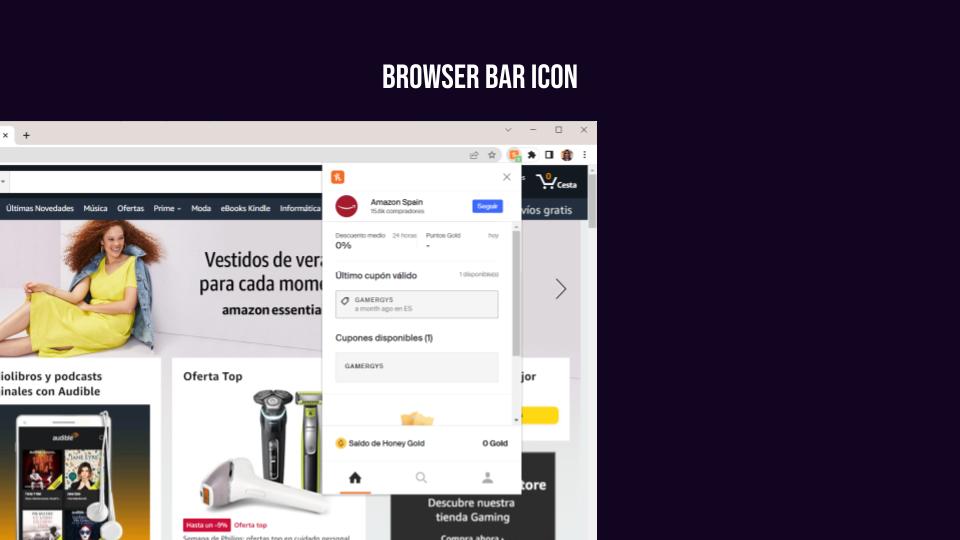
Right after installing an extension, an app icon (a.k.a. action icon) is placed in the browser bar. This icon automatically hides in Chrome, unlike in Firefox where it remains visible. This icon is the minimum visible element capable of providing some user feedback.
App icons can display a badge as a small text layered over the icon. This could be pretty useful to show notifications, alerts, counters, etc. However, for those scenarios where users decide to hide it, important alerts could be ignored if we just rely on them.
What is an important alert and how we should notify users is a whole different debate and it's out of the purpose of this article. So at this point, the first design considerations to be made are:
- Use the bar icon badge to give relevant and timely feedback only.
- Adding some value to the app icon will make people keep it visible.
Another consideration of app icons is that browsers let you display some content as a pop-up when clicking the icon. This gives us a small but relevant place for users to interact with the extension. This place should be more than enough if we really follow the Single Purpose policy.
Cotextual content
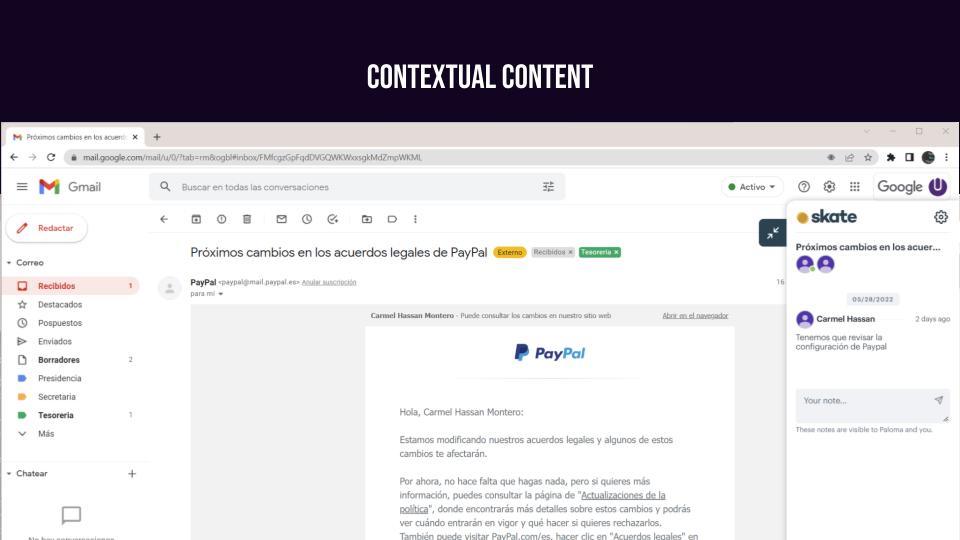
Most of the extensions offer value based on a specific context. Sometimes the context is defined by the interaction, the content and the URL you are visiting. When you select, hover or write something, there are extensions that display contextual information.
There are two ways of designing extensions that react to a context:
- As a pop-up that appears only when needed.
- As a piece of content within the page.
The good thing about pop-ups (e.g. Grammarly) is that these extensions are only visible when needed, they are not present all the time or require your attention. On the negative side, we can find that many of these extensions reacting to the same interactions might be overwhelming.
On the other hand, modifying the content of the page like Keepa extension is a good choice if the context is defined only by the page URL. The benefit from the design perspective is that the extension is visible all the time. The challenge is to keep a good integration of the design style so it doesn't look too cluttered.
New tab
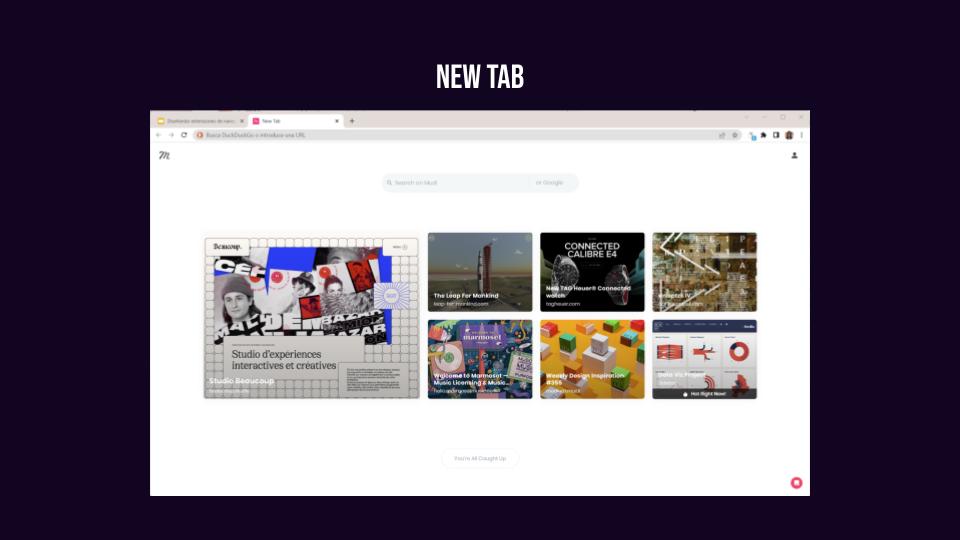
Some extensions work when you open a new tab. From the design perspective, you can just follow similar patterns to website design. There's no restriction on space and you can gain the user's attention. However, modifying the 'new tab' is still challenging: you must compete with other extensions. That is the case with Eesel and Muzli. The first one is clearly oriented to improve efficiency when navigating through different apps in a working context. The second one is made to provide inspiration for the next place to go. Two different modes of navigation might have a great impact on the experience.
Background extensions
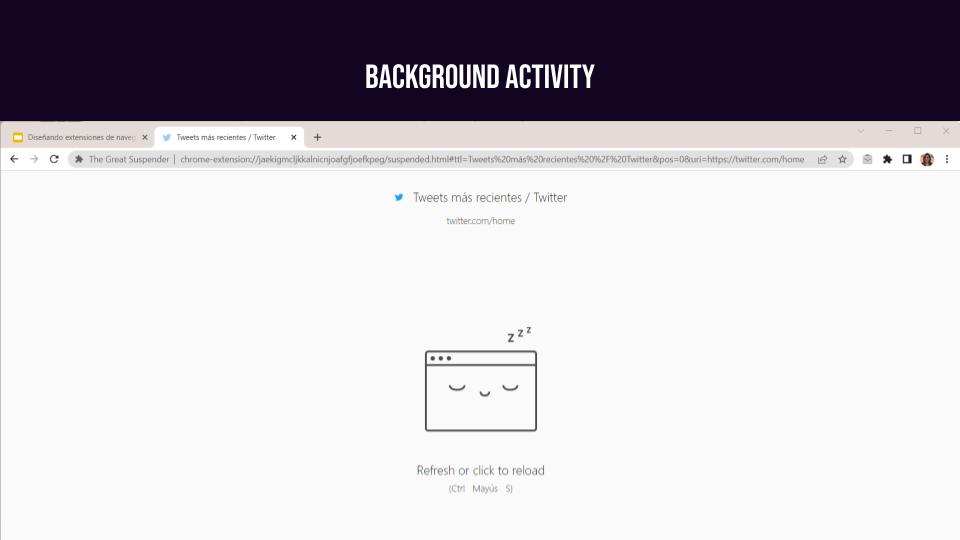
Some extensions do not respond directly to user interaction, rather they just execute when something else happens. Like The Great Suspender, which is meant to improve the performance of the browser by suspending the background process of inactive tabs. Nevertheless, there's always a need of providing user feedback. These are some questions that the design should answer:
- What is the status of the process in the background?
- How does it impact user interaction?
- How can users recover and gain control over the situation?
- How can users customise the automatic execution of that background process?
Other design considerations
Some well-known web design patterns might need special consideration when it comes to designing browser extensions.
The most important particularity is that extensions are not the centre of attention. This means that you cannot expect people to engage as they would do in a social network. Extensions work like a canvas-based UI tool, they are in the margin ready to be used only when needed.
Another consideration is that we have very little space to design thus complex navigation and interaction patterns must be avoided. But working with restrictions from the design perspective could be beneficial many times to avoid adding unnecessary content.
Another obvious observation is that extensions are as easier to uninstall as they are to install. People are one click away to forget what you designed. If you don't add value from the very first moment, users won't be inactive but gone forever.
Last, but not least, every new extension impacts the browser performance, so make sure that what you design really worth people's experience.
This post is a summary of a talk that I made at the DyploFest 2022 event in Málaga. If you want to go deeper in detail do not hesitate to catch up with me on Twitter.